
Neon Line Drawing Canvas


Create Glowing Artwork with Neon Line Drawer
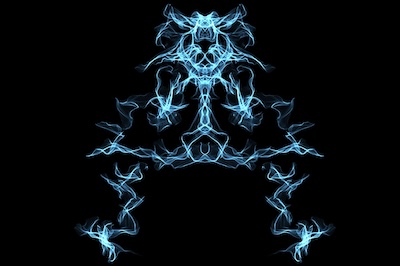
Neon Line Drawer is an interactive digital art tool that lets you create bright, glowing designs directly in your browser. Instead of using ordinary flat lines, every stroke can shine with a colorful neon effect. You can draw futuristic illustrations, abstract light trails, geometric patterns, glowing symbols, waveform designs, space scenes, logos, and many other creative compositions on a dark canvas.
Choose from Multiple Drawing Tools
The tool includes a standard pen for precise drawing, a glow brush for softer luminous strokes, and a spray brush for sparkling particle effects. You can also create straight, curved, dashed, dotted, and dash-dot lines. The built-in shape collection makes it easy to add circles, triangles, squares, diamonds, pentagons, hexagons, octagons, stars, hearts, arrows, lightning bolts, and crosses without drawing them manually.
Customize Every Neon Stroke
Neon Line Drawer gives you detailed control over the appearance of your artwork. Adjust line thickness, glow intensity, smoothness, opacity, and blur using simple sliders. Choose from vivid blue, purple, pink, orange, yellow, green, and cyan colors, or activate the rainbow option to create multicolored strokes. You can also change the canvas background to produce different visual moods.
Use Symmetry and Mirror Drawing
The symmetry and mirror drawing features are useful for creating balanced artwork. A single movement can be reflected across the canvas, helping you produce butterfly-like patterns, masks, decorative symbols, futuristic emblems, and symmetrical line art. Snap mode can also help keep straight lines aligned at clean angles.
Add Animated Light Effects
Trails, glow, and pulse animation make the drawing feel energetic and alive. The optional perspective grid gives the canvas a retro synthwave atmosphere, while animated light effects add depth to each stroke. Several ready-made styles are available, including Cyber Blue, Laser Pink, Electric Mix, Aurora, Rainbow Pulse, Neon Green, and Synthwave.
Edit, Record, and Save Your Creation
You can undo or redo changes, erase selected areas, or clear the entire canvas whenever you want to begin again. Finished artwork can be exported as a PNG image, while the recording feature captures the drawing process as it happens. Fullscreen mode provides a larger workspace for detailed designs and makes the tool especially enjoyable on large displays, tablets, and touch-enabled devices.